

Creating a travel agency website has never been easier, thanks to the power and flexibility of premium WordPress themes. In today’s digital era, travelers rely heavily on online platforms to plan trips, explore destinations, compare packages, and make bookings. This makes having a professional, visually appealing, and fully functional travel website essential for any travel business looking to grow. A premium WordPress theme not only gives your website a polished and modern appearance but also comes packed with advanced features like tour listings, booking systems, itinerary layouts, customer reviews, and seamless integration with essential plugins.
Whether you’re building a website for a travel agency, tour operator, or holiday planner, these themes offer ready-made templates that save time and allow easy customization. In this blog, you’ll learn step-by-step how to create a travel agency website using a premium WordPress theme, ensuring your platform stands out and meets the expectations of modern travelers. If you prefer drag-and-drop designing, you can explore WordPress Elementor themes, which provide visually stunning layouts, real-time editing, and user-friendly customization to build an engaging travel website without coding.
Benefits of Creating a Travel Agency Website
Creating a travel agency website offers immense advantages for businesses looking to grow, attract more customers, and establish a strong online presence. In today’s digital travel market, most customers prefer researching destinations, comparing packages, and booking trips online. A well-designed travel agency website not only enhances your brand’s credibility but also helps streamline operations and improve customer experience. Below are seven key benefits that make having a professional travel website essential for every modern travel business.
- 24/7 Online Presence: Your services stay accessible to customers at all times, allowing them to explore tours, check availability, and make bookings anytime.
- Builds Trust and Credibility: A professionally designed website helps your travel agency appear reliable, knowledgeable, and established.
- Showcase Packages and Destinations Easily: You can display tour packages, itineraries, destination highlights, and pricing in an attractive and organized way.
- Automated Booking and Inquiries: Integrated booking systems reduce manual work and make the booking process smoother for customers.
- Reach a Global Audience: Your website expands your reach beyond local customers, helping you attract travelers from around the world.
- Improves Marketing and SEO: Blogs, landing pages, and SEO optimization help you rank on Google and attract organic traffic.
- Enhances Customer Engagement: Features like reviews, galleries, and FAQs help customers make informed decisions.
In short, a travel agency website helps you grow faster, work smarter, and deliver a seamless experience that today’s travelers expect.
Steps to Create a Travel Agency Website
When you decide to create a travel agency website using WordPress, you gain access to an easy-to-use platform, countless customization options, and a wide range of travel-specific themes and plugins that make the entire process smooth, efficient, and beginner-friendly. Below are the steps to create a travel agency website from scratch using WordPress and a premium travel theme.
Step 1: Purchase Domain and Hosting

The first step to create a travel agency website is securing your domain name and hosting plan. A domain name is your website’s online address, something like www.yourtravelbrand.com, and choosing it carefully is important because it reflects your brand identity. Ideally, it should be short, easy to remember, and related to your travel business. Your hosting plan, on the other hand, is where all your website files are stored. To create a travel agency website that loads fast and performs well, select a hosting provider known for reliability, strong uptime, and good server speed.
Many hosting companies provide beginner-friendly plans that include one-click WordPress installation and SSL certificates. An SSL certificate ensures your site is secure, which is essential for a travel business that handles inquiries, customer details, and payments. Once you register your domain and activate your hosting account, you can then connect both, allowing your website to go live on the internet. For best performance, consider choosing the fastest hosting for WordPress, as it ensures faster loading times, improved user experience, and higher ranking potential. This foundational step sets the stage for the remaining setup, making it easier to create a travel agency website with a professional structure.
Step 2: Install WordPress
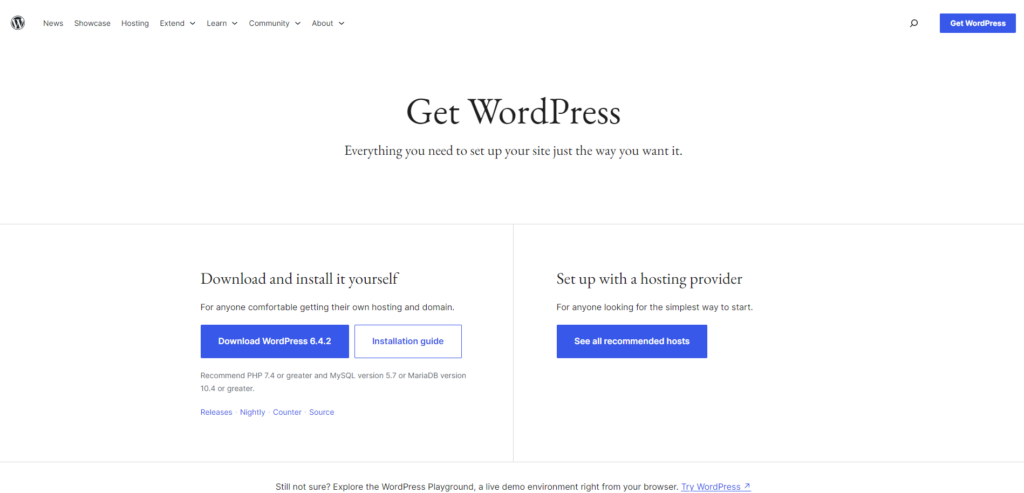
Once your domain and hosting are ready, the next step is installing WordPress. Most modern hosting companies provide a simple one-click WordPress installer, making the process fast and beginner-friendly. This installation will set up your website’s backend, giving you access to the WordPress dashboard.
Inside the dashboard, you will find tools to manage pages, posts, themes, plugins, menus, and settings. WordPress is ideal for travel websites because it offers flexibility, supports powerful plugins, and makes customization effortless, even without technical skills. When you create a travel agency website with WordPress, you benefit from a platform that is scalable, stable, and highly compatible with modern design tools like Elementor. After installing WordPress, set up key settings like permalinks for SEO-friendly URLs, timezone preferences, and general configuration. Completing this step ensures your technical structure is ready for design and content integration, especially if you plan to use one of the best travel WordPress themes to build a visually stunning and high-performing travel site.
Step 3: Choose and Install a Premium Travel Theme

Once WordPress is installed, the next major step to create a travel agency website is selecting a professional travel-focused theme. While hundreds of free themes exist, using a premium theme ensures better performance, advanced design options, and industry-specific features. One highly recommended option is the Travel Agency WordPress Theme by WP Elemento.
This premium theme is specifically designed for travel businesses and offers every component required to create a stunning, fully functional travel agency website. It is fully Elementor-friendly, making it easy to design pages using simple drag-and-drop tools. It is also responsive, meaning your travel website automatically adjusts to mobile devices, tablets, and laptops. The theme is WooCommerce-ready, allowing you to integrate online bookings and payments effortlessly, which adds professionalism and convenience for your customers. Priced affordably at $40, it provides excellent value for money.
Once you purchase the Travel Agency WordPress Theme by WP Elemento, you receive the theme file and a license key via email. To install the theme, log in to your WordPress dashboard, go to Appearance > Themes > Add New, upload the theme file, and activate it. This step immediately transforms your website’s layout, giving you a professional travel design that you can further customize. Installing a premium theme is one of the most important steps when you create a travel agency website because it sets the visual foundation for your brand.
Step 4: Import Demo Content

After installing and activating the Travel Agency WordPress Theme by WP Elemento, you will see a button labeled Get Started. This feature simplifies the setup process by allowing you to import pre-designed demo content with just a few clicks. When building a website, demo content helps you visualize page structures, layouts, and design elements before customizing them to match your brand.
Click the Get Started button, enter your license key, and proceed with demo import. The system will automatically install and activate all required plugins, such as Elementor, WooCommerce, and other travel-specific tools. Once dependencies are installed, the demo content import begins. This includes sample pages like Home, About, Tours, Destinations, Packages, and Contact.
Importing demo content saves time and gives beginners an accurate starting point to create a travel agency website without worrying about designing from scratch. It ensures that your site layout is professionally structured, visually appealing, and aligned with current design standards used by successful travel companies. Once the import completes, your website will look exactly like the theme’s live demo, ready for customization.
Step 5: Customize Header, Footer, and Pages

With the demo imported, you are ready to customize your travel agency website. The Travel Agency WordPress Theme by WP Elemento is fully integrated with Elementor, which means you can design and modify each section visually.
Start by customizing your header, which includes your logo, navigation menu, contact number, and booking buttons. The header should be clean, easy to navigate, and optimized for quick access, as customers often look for destinations, packages, and contact details immediately. The footer should include essential links, social media icons, and your company information.
Next, move on to customizing pages like the Home Page, About Page, Destination Page, Tour Listings, and Contact Page. Elementor allows you to replace text, add images, update banners, change icons, and modify layouts without coding. This helps you create a travel agency website that perfectly reflects your branding and messaging.
Customizing your pages ensures that your website stands out, aligns with your business identity, and offers a user-friendly experience. From color schemes to typography, every detail can be tailored using Elementor’s intuitive interface. This creative step transforms your demo site into a personalized travel agency website ready for real customers.
Step 6: Add Travel Packages, Tours, and Destinations
Once your pages are customized, the next step to create a travel agency website is adding actual content, such as travel packages, tours, and destination information. The Travel Agency WordPress Theme by WP Elemento provides built-in templates to showcase tours in an attractive, organized way.
For each travel package, include essential details such as the itinerary, inclusions, exclusions, pricing, duration, departure dates, and visual highlights. Adding high-quality images and destination descriptions helps inspire travelers and improves engagement. You can categorize tours by type, such as adventure tours, honeymoon packages, family trips, weekend getaways, or international destinations.
Use separate destination pages to highlight popular locations, adding maps, climate information, best visiting seasons, and local experiences. Clear categorization and detailed content make it easier for customers to navigate your tour offerings.
This step is crucial because the core purpose of creating a travel agency website is showcasing your travel services in a professional, compelling format. Well-structured packages not only improve the user experience but also help boost your website’s SEO performance.
Step 7: Set Up Booking and Payment Options
A travel website becomes complete only when you enable online bookings and payment options. Using WooCommerce, you can integrate a seamless booking system that lets customers check availability, select dates, and complete bookings online.
Set up online payments by configuring payment gateways such as Razorpay, PayPal, Stripe, or direct bank transfer. A travel agency website must offer secure and reliable payment processing to build customer trust. WooCommerce also allows you to set variable pricing, custom booking forms, and automatic email confirmations.
For travel businesses, automated bookings help reduce manual workload and prevent booking errors. By integrating an online booking system, you create a travel agency website that is convenient, professional, and aligned with consumer expectations.
Step 8: Install Essential Plugins (SEO, Security, Caching, CRM)

Plugins enhance your website’s functionality and improve both performance and security. When you create a travel agency website, the following plugins are essential:
- SEO Plugin such as Rank Math or Yoast SEO helps optimize your content and improve search rankings.
- Security Plugin such as Wordfence protects your site from malware and hacking attempts.
- Caching Plugin like LiteSpeed Cache speeds up your website by reducing load times.
- CRM or Form Plugins help manage travel inquiries and capture customer details.
Install best seo plugins for woocommerce these plugins ensures your travel agency website is stable, secure, and optimized for high performance. With proper SEO setup, you can attract organic traffic and improve your online visibility.
Step 9: Optimize Images and Speed
A visually rich travel website requires high-quality images, but heavy images can slow down loading speed. To create a travel agency website that loads fast and performs well, optimize your images using compression tools. Use WebP format whenever possible.
Speed optimization techniques include enabling caching, minimizing CSS and JavaScript, and using a fast hosting provider. A fast website helps improve user experience, reduces bounce rates, and boosts your SEO performance. Travel customers expect fast navigation, especially when browsing destinations and packages, so speed optimization is essential.
Step 10: Test and Launch the Website

Before launching your travel agency website, perform a thorough check of all pages, forms, links, booking systems, and payment gateways. Test the website on mobile devices, tablets, and desktops to ensure responsiveness. Review the content for accuracy, grammar, and branding consistency.
Once you confirm everything is functioning correctly, you can officially launch your travel agency website. Share it across your social platforms, list it on Google My Business, and begin promoting your tours and services.
Launching the website marks the final step in your journey to create a travel agency website. With the right theme, plugins, content, and setup, your site is now ready to attract travelers, generate leads, and handle bookings professionally.
Conclusion
Creating a travel agency website is a powerful step toward building a strong digital presence and reaching travelers worldwide. Throughout this guide, we have explored the key benefits of creating a travel agency website and walked through each essential step required to build one successfully. With WordPress, the process becomes smooth and beginner-friendly, allowing you to manage pages, bookings, destinations, and packages with ease. To achieve a professional and visually appealing design, selecting the right theme is crucial. For a cost-effective and versatile solution, you can explore a WordPress theme bundle, which offers multiple premium themes in a single package perfect for travel businesses that may want to launch different pages, microsites, or niche services with consistent branding.
This is why the Travel Agency WordPress Theme by WP Elemento is highly recommended, offering Elementor compatibility, responsive layouts, and quick setup features. With the right tools and strategy, you can confidently create a travel agency website that drives engagement, boosts bookings, and supports long-term business growth.

